 Joachim van de Haterd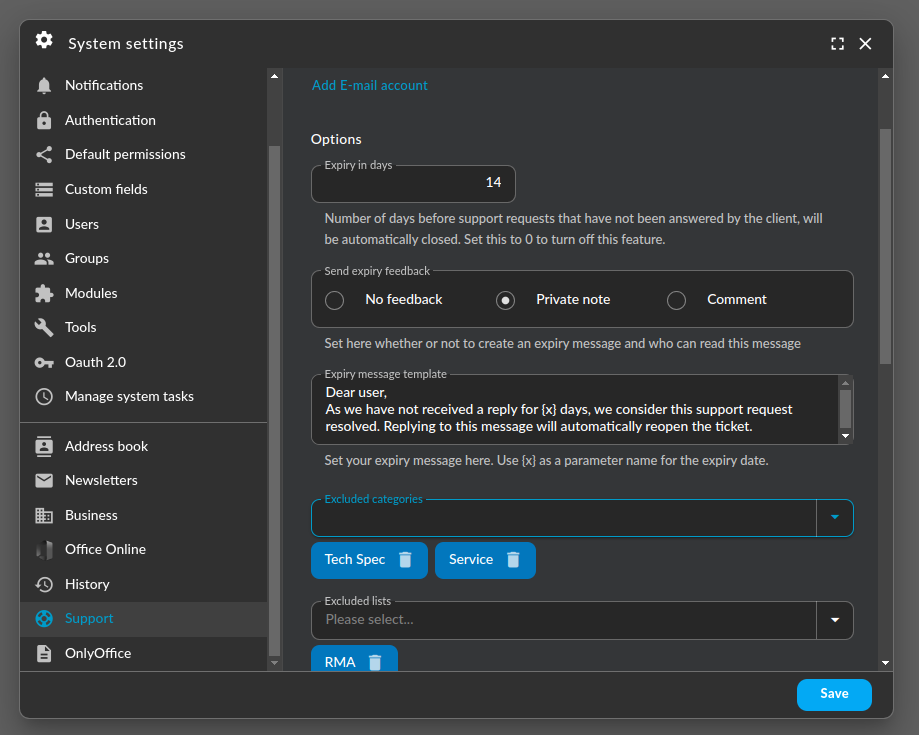


Starting from version 6.8.58, you can configure GroupOffice to automatically close inactive tickets.
Ticket lists can get messy at times. Either the support crew is too busy to clean up old tickets or after a reply, the ticket is forgotten by the requester.
In the old Tickets module, you could close a ticket after a certain inactivity. This feature has been ported to the support module.
Configuration options
Please note that an inactive ticket is defined as a ticket with the status 'In progress' that was last answered by a ticket agent and has not had any activity for a certain amount of days.
- Expiry in days: The number of days that a ticket is inactive before automatically closing it.
- Expiry feedback: Either none, a private comment readable by ticket agents only or public. In the latter case, an email is sent to the requester.
- Expiry message template: This will enable the administrator to set a custom expiry message.
- Excluded categories: Do not automatically close tickets that have one of these categories added.
- Excluded lists: Do not automatically close tickets that are part of excluded support lists.