 Merijn Schering


The customer support module for GroupOffice just got some new features in version 26.0.42.
E-mail notifications
It's now possible to setup these notifications:
- Auto reply e-mail to the customer when a new customer e-mail arrives in the support module.
- E-mail to the support agent when a new ticket has been created either via the web UI or incoming e-mail.
- When a ticket has been assigned. The support agent can be notified via e-mail instead of an internal notification.
The agent e-mail notifications are particularly useful for those who don't have GroupOffice open all day.
You can find it in the menu next to the support lists:
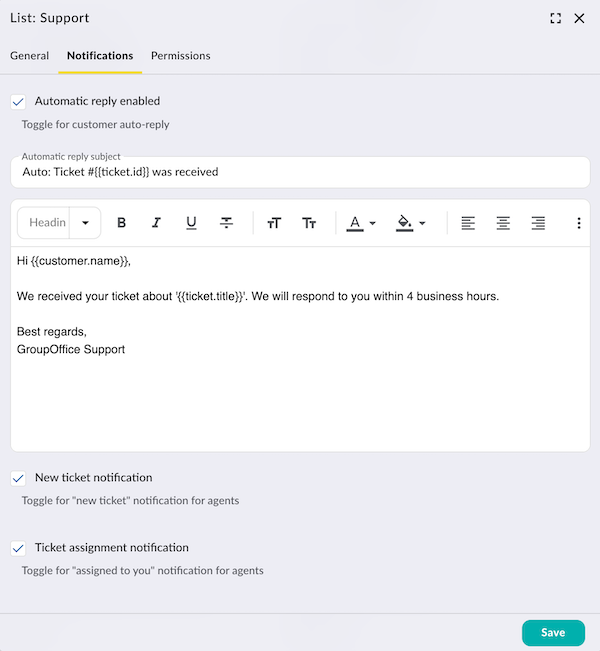
The auto reply e-mail is a template that you can tailor to your needs.
Support e-mail status
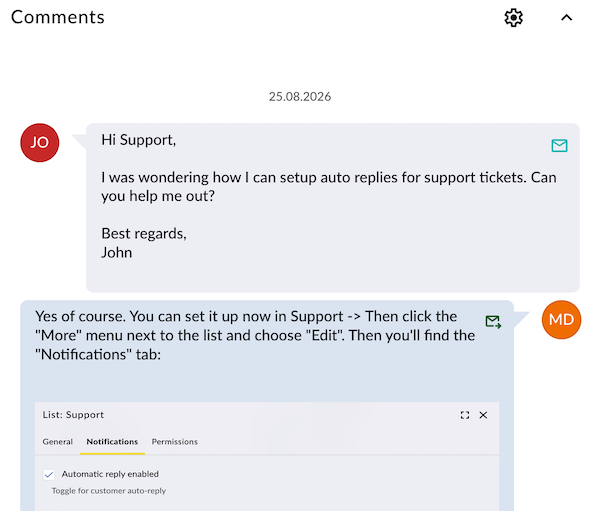
When viewing at tickets, the agents can now see the mail status on each message with an icon. The statuses are:
- Mail received: Indicating this message has been imported into GroupOffice via the support mailbox
- Mail sent: Indicating that the message has been sent via e-mail to the customer
- Mail in progress: Mail is being sent.
- Mail error: Mail sending failed.
Additionally the user experience has been improved because the user interface does not have to wait until the mail has been sent when sending a customer response. This happens in the background now and agents can see the status via the icons in the top right of the messages:
Upgrade now
If you want to use these new features then find out how to upgrade to the latest version of GroupOffice at: